
 Español
 Português PT
 English
 Français


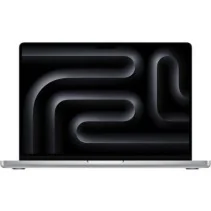
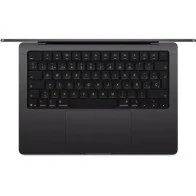
Apple Macbook Pro 14" M5

New Product. European Warranty

Fast and free shipping

Multiple payment methods

Return policy

Yes. This configuration combines the Apple M5 chip with a 10-core CPU, 10-core GPU, 16 GB of unified memory, and a 1 TB SSD. It is a suitable option for advanced productivity, programming, content creation, editing, and professional applications compatible with macOS and Apple Silicon.
The main difference is storage. This version features a 1 TB SSD, double the capacity of a 512 GB configuration, providing more space for applications, photographs, videos, professional projects, and other files.
The 1 TB SSD is especially appealing for those who work with photographs, videos, programming projects, professional applications, or large files. It also allows for more internal space before having to resort to external storage.
The internal storage is not designed to be upgraded later by the user. If more capacity is needed in the future, compatible external SSD drives can be used via its Thunderbolt connections.
16 GB is suitable for productivity, programming, editing, and regular multitasking. For professional workloads that require large amounts of memory continuously—such as certain virtual machines, complex audiovisual projects, or local artificial intelligence models—it is advisable to check the requirements of the applications used beforehand.
No. The unified memory is part of the Apple Silicon architecture and is not designed to be upgraded after purchasing the computer. For this reason, it is important to choose a capacity appropriate for the intended use from the very beginning.
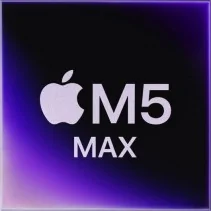
The M5 chip features a 10-core CPU, consisting of 4 performance cores and 6 efficiency cores, along with a 10-core GPU. It also includes Neural Accelerators, a 16-core Neural Engine, hardware-accelerated ray tracing, and 153 GB/s of memory bandwidth.
Yes. The M5 chip, 16 GB of unified memory, and 1 TB SSD provide a suitable configuration for programming and development environments compatible with macOS and Apple Silicon. For virtual machines, containers, or particularly demanding tools, it is wise to review their specific memory and compatibility requirements.
Yes. The M5 incorporates hardware acceleration for H.264, HEVC, ProRes, and ProRes RAW, in addition to dedicated video encoding and decoding engines and AV1 decoding support. The 1 TB SSD also offers ample space to store projects and audiovisual files.
Yes. Its Liquid Retina XDR display supports wide color gamut (P3), True Tone, and 1 billion colors. Combined with the M5 chip and 16 GB of unified memory, it provides a suitable configuration for photography and design applications compatible with macOS.
Yes. The M5 chip incorporates a Neural Accelerator in each GPU core and a 16-core Neural Engine. It is designed to accelerate compatible artificial intelligence workloads and can run applications capable of executing local AI models.
Yes, provided the model and application are compatible with macOS and Apple Silicon and their requirements fit within the available resources. 16 GB of unified memory may limit the size of certain models, so for especially demanding local AI workloads, a configuration with more memory may be advisable.
The MacBook Pro includes features specifically tailored for demanding work, such as a Liquid Retina XDR display with ProMotion up to 120 Hz, active cooling, and broader connectivity. The MacBook Air prioritizes a lighter design and fanless operation.
Yes. The Liquid Retina XDR display incorporates ProMotion technology with an adaptive refresh rate of up to 120 Hz, offering greater fluidity during scrolling, animations, and compatible content.
It features a 14.2-inch Liquid Retina XDR display with a native resolution of 3024 by 1964 pixels and a pixel density of 254 pixels per inch.
Apple specifies 1,000 nits of sustained XDR brightness across the full screen and up to 1,600 nits of peak brightness for HDR content. It can also reach up to 1,000 nits of SDR brightness outdoors.
Yes. Unlike the MacBook Air, the MacBook Pro uses active cooling. This is particularly relevant for maintaining performance during prolonged demanding workloads, such as code compilation, video editing, rendering, and other intensive professional tasks.
It features three Thunderbolt 4 (USB-C) ports, an HDMI port, an SDXC card slot, a MagSafe 3 connection, and a 3.5 mm headphone jack. This variety of connections reduces the need to use adapters for many common peripherals.
Yes. It incorporates an HDMI port and an SDXC card slot. These connections are especially useful for connecting displays directly and for users working with photography and video.
The 14-inch MacBook Pro with the M5 chip supports up to two compatible external monitors in addition to its built-in display. The available resolutions and refresh rates depend on the combination of displays and connections used.
Yes. The MacBook Pro M5 supports an external display up to 8K at 60 Hz via HDMI. It is also compatible with a display up to 4K at 240 Hz using a compatible setup.
Its 14.2-inch screen aims to combine workspace and portability. It is an especially attractive option for professional users who need to frequently transport the device and can connect external monitors when working at a desk.
No. Silver is one of the official finishes available for the 14-inch MacBook Pro. The color does not modify performance when comparing computers with the same chip, memory, storage, and display configuration.
If both versions incorporate the same M5 chip and 16 GB of unified memory, the main difference is storage. This configuration features 1 TB, double that of the 512 GB version, making it especially appealing for those who need to store applications, photographs, videos, and professional projects directly on the Mac.
Check out information on the best Apple laptops on our blog and get the best deals.

MacBook Pro M5: We analyze the new generation of Apple laptops...
Read more
We analyze the 3 best-selling Apple laptops: MacBook Air M4...
Read more
Learn how to choose the ideal Apple computer according to your needs.
Read more